CL Theme Flexure
Apps LabDevAuto & Vehicles
4.12.00 Reviews
- Version
- 1.4
- Installs
- 10.00K
- Age Rating
- Everyone
Screenshots
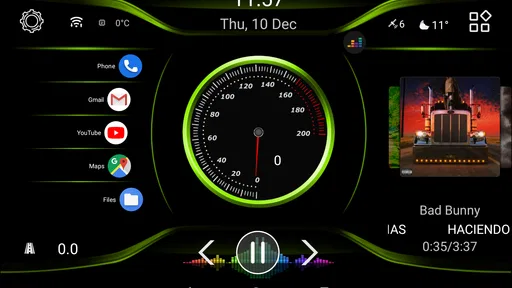
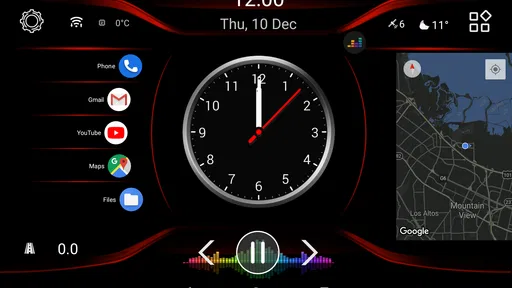
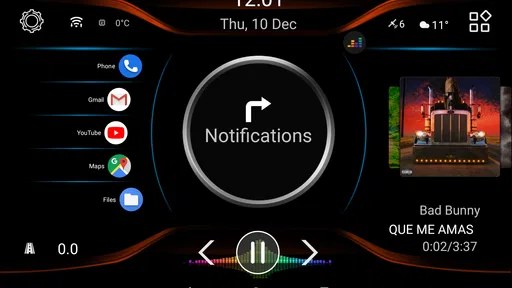
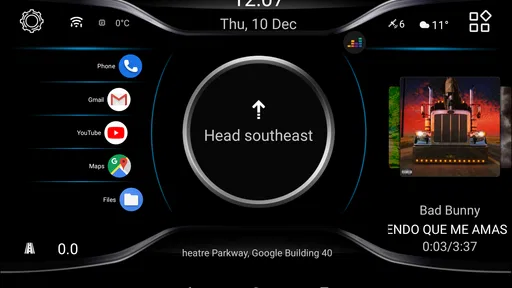
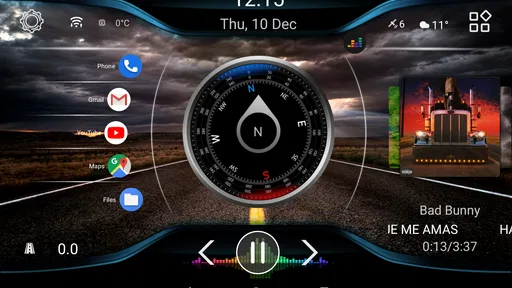
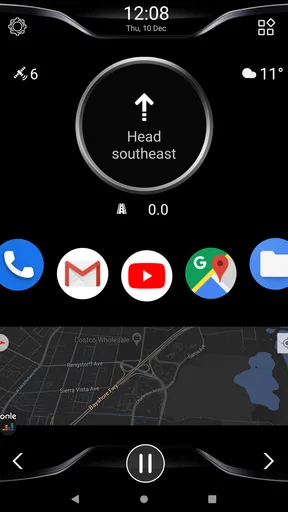
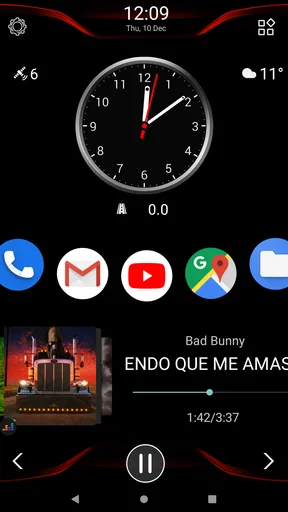
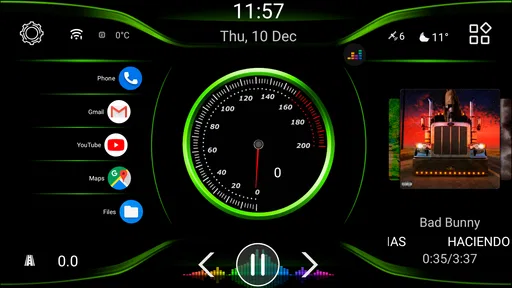
Our Review of CL Theme Flexure
 Analysis by Appyee
When it comes to customizing a phone used by more than one person, I care about more than a good-looking screen. A theme can make a shared device easier to recognize, but it can also make navigation less familiar for the next person who picks it up. That is the balance I keep in mind with CL Theme Flexure: it is a theme for Car Launcher 3+, so its appeal is tied to that launcher rather than to changing every phone screen. I would consider it when a household already uses Car Launcher and wants a distinct look, not as a general-purpose family customization tool.
First Impressions
From the moment I opened CL Theme Flexure, I was greeted with an intuitive and vibrant interface. It’s not just functional; it’s designed to be a feast for the eyes. The app's design is sleek, which is a great start because, let’s face it, nobody wants an app that looks like it’s from the early 2000s. Browsing through the theme options felt like flipping through an art gallery, each theme more enticing than the last.
A theme for a shared car screen
The household use case here is specific: a phone or screen running Car Launcher may be used by a driver and another family member, or passed between people who share a vehicle. A visual theme can help make that interface feel less like a generic dashboard and more like a familiar part of the car. Still, I would treat appearance as a personal preference, not as a coordination feature. Nothing about a theme should be assumed to create separate user profiles, synchronize preferences between people, or manage who can change the setup.
In an everyday situation, one person might set up the launcher before a commute, while another uses the same device later for a school run. I would agree on a stable layout first, then try the theme when the car is parked and there is time to check that the important controls remain easy to spot. If the second driver relies on a particular arrangement, keeping that arrangement intact matters more than choosing the most striking visual style. A recognizable look is useful only if it does not make the shared screen harder for someone else to use.
What the theme changes—and what it does not
Because this is a companion theme for Car Launcher 3+, the key question is whether you already use that launcher. It is not the same kind of purchase as a complete launcher that replaces a phone’s home screen, nor is it a general wallpaper app. The launcher provides the environment; this app supplies a theme for it. That distinction helps set expectations: if you want to reorganize a phone’s whole interface or change how unrelated apps look, a broader customization tool is a better fit.
I would also separate the theme from the content and settings shown in the launcher. A different appearance does not automatically mean different accounts, driver profiles, or permissions. For a shared device, decide whose preferences should govern the layout before making visual changes. If each person wants a separate arrangement, this theme alone is not a substitute for a system that actually supports separate profiles.
Features Galore
One of the standout features is the sheer variety available. Whether you're into minimalistic designs or something more extravagant, this app has got you covered. I particularly enjoyed the seasonal themes that they offer. It’s like your phone changes outfits to match the time of year, and honestly, who wouldn’t love that?
Another cool feature is the ability to customize individual elements. You can mix and match different icons and wallpapers to your heart’s content. This is perfect for those of us who can’t settle on just one look. Plus, the app lets you preview themes before applying them, so there are no nasty surprises.
For a shared setup, previewing before applying is especially useful as a decision step: the person who maintains the car screen can compare a look without committing immediately, then ask the other regular users whether the result feels clear. I would make changes one at a time rather than adjusting several visual elements in one sitting. That makes it easier to identify which choice improves readability and which one simply looks appealing in a preview.
Setup without disrupting the routine
The practical first question is whether Car Launcher 3+ is already installed and working on the device. Since this is a theme for that launcher, someone who does not use it should not expect the theme to act as a standalone dashboard or a complete phone makeover. I would check compatibility in the launcher context before paying, and make sure the person who will use the screen is comfortable with the existing setup.
My own cautious workflow would be to make the change while parked, preview the appearance, and then check the screen from the position where it will normally be viewed. A layout that looks tidy while holding a phone close can feel different at a glance in a vehicle. I would also keep a note of the previous visual choices or take a screenshot before changing anything; that is a simple way to make a return to the familiar arrangement less stressful if other household users dislike the new look.
There is a small but important trade-off in customization: more choice can invite more tweaking. If one person enjoys adjusting icons and wallpapers while another just wants the launcher to stay predictable, agree on a stopping point. For a shared car device, a restrained setup that everyone recognizes may be more useful than a highly personalized one that changes every few days.
User Experience
Now, onto the user experience. Installing a theme is a breeze. The app guides you through every step, so there’s no chance of getting lost. I appreciated the little tips and tricks that pop up occasionally, making sure you’re getting the most out of the app. It's like having a personal theme consultant in your pocket.
Performance-wise, CL Theme Flexure runs smoothly. I didn’t experience any lags or crashes, which is a big win in my book. It seems to be well-optimized for both Android and iOS devices, making it accessible to a wider audience.
Who should pay for it?
At $2.49, I would treat this as a focused customization purchase rather than an essential car utility. It makes the most sense for someone who already enjoys Car Launcher and wants to change its look. Apps LabDev is the developer, and the theme’s niche purpose is worth keeping in mind: if you are not using the launcher it is designed for, the purchase is unlikely to solve your customization needs.
The app has a 4.1 average from 47 ratings, with 10K+ installs. Those figures suggest that people have tried it, but they do not tell me whether its style will suit a particular household or whether everyone will find the same arrangement comfortable. I would base the decision on the launcher you use and how much you value a themed appearance, rather than assuming popularity means it is right for every shared device.
Its Everyone content rating makes the age context straightforward, but that should not be confused with household controls. A theme does not establish boundaries between a parent’s preferences and a child’s, or prevent someone from changing the screen. If children use the device, I would keep any important settings under an adult’s supervision and focus on a layout that is clear and easy to restore. For a shared vehicle, safe and predictable interaction should come before novelty.
The version is 1.4, and the app was released on Dec 10, 2020. It supports a minimum OS of 4.0, which can make it relevant to older Android setups, though compatibility still depends on the launcher and device combination. I would not choose it for a household expecting a theme to handle account separation, automatic coordination, or broad device-wide styling; those needs call for different tools or arrangements.
Coordination matters more than matching tastes
In a household, the most useful question may be who gets to make changes. If one person is responsible for maintaining the launcher, tell the other regular users what is changing and keep the core layout recognizable. If everyone expects to customize the screen, settle on a shared baseline first. That small bit of coordination can prevent a harmless visual experiment from becoming a confusing surprise on the next drive.
I would also avoid treating a matching look as proof that two devices are configured the same way. A theme concerns appearance, while each device may have its own launcher setup and preferences. If two family members use separate devices, check each one individually rather than assuming a visual choice carries over. This is a useful distinction when a household wants consistency but does not want to spend time troubleshooting mismatched arrangements later.
Compared with the usual alternatives, this sits between leaving Car Launcher’s existing appearance alone and choosing a full launcher or broader customization app. Leaving things unchanged is free of setup effort and often best for a device everyone already understands. A full launcher offers a wider redesign but is unnecessary if the only goal is a different look inside Car Launcher. A general wallpaper changer may alter the phone’s background but will not necessarily provide a coordinated theme for the car-launcher interface. I would choose the narrow option only when that is exactly the part I want to change.
The Creative Community
What really sets this app apart is its community aspect. Users can share their own creations and download themes made by others. It’s a great way to see how creative people can get and even inspire your own customizations. I found myself spending more time than I’d like to admit just browsing through user-generated content. It’s like Pinterest, but for your phone’s theme!
When I would skip it
I would skip this purchase if I wanted a complete dashboard replacement, a new set of phone-wide controls, or a way to keep multiple people’s preferences separate. I would also pass if the existing Car Launcher appearance already works well for everyone who uses the device. A theme is most satisfying when the underlying launcher is already part of your routine; otherwise, the extra step can feel like buying decoration before deciding whether you need the room it decorates.
I would be cautious, too, if a driver is easily distracted by visual changes or depends on a very familiar screen arrangement. In that case, keeping the current setup is a sensible choice, not a failure to customize. Try changes only when parked, and let regular users test whether the result remains easy to recognize. For a device used by just one person who enjoys making it personal, there is more freedom to experiment.
Why You Should Try It
If you’re someone who loves to keep their phone looking fresh and unique, I can’t recommend CL Theme Flexure enough. It’s fun, engaging, and offers a level of customization that’s hard to find elsewhere. Plus, it’s regularly updated, so there’s always something new to look forward to.
In a world where our phones are practically an extension of ourselves, having a personalized theme can really make a difference. So why not give it a whirl? It might just become your new favorite app for spicing up your device.
In conclusion, CL Theme Flexure is more than just a theme app; it’s a platform for expression and creativity. Whether you’re a theme enthusiast or a casual user, this app has something for everyone. So go ahead, dive in, and let your phone reflect your style!
Verdict
Strengths of CL Theme Flexure
- Intuitive user interface with smooth navigation.
- Extensive customization options available.
- Lightweight, doesn't slow down the device.
- Regular updates with new features.
- Compatible with a wide range of devices.
Limitations of CL Theme Flexure
- Limited free features, premium needed for full access.
- Occasional bugs in certain themes.
- Some features require a stable internet connection.
- Ads can be intrusive in the free version.
- Customer support response can be slow.
Other Releases by Apps LabDev
View All
Car Launcher
Auto & Vehicles4.3

Car Launcher Pro
Auto & Vehicles4.4
Similar Picks in This Category
View All
Android Auto
Google LLC4.1

maxim — order a taxi & food
PT. SITO4.7

Штрафы ГИБДД: проверка с фото
Pays LLC – Штрафы ГИБДД4.7

Номерограм – проверка авто
Авто Ассист4.8

Дром Авто
Дром4.9

Frequently Asked Questions
What is CL Theme Flexure and what does it offer?
CL Theme Flexure is a versatile theme customization app designed for Android and iOS devices. It allows users to personalize their smartphone interface with a wide range of themes, icons, and widgets. The app offers a user-friendly interface, making it easy to switch between themes and customize according to personal preferences.
Is CL Theme Flexure compatible with all devices?
CL Theme Flexure is compatible with most Android and iOS devices. However, it's crucial to check the app's compatibility with your specific device model and operating system version. The app regularly updates to support new devices, but older models may experience some performance limitations.
Are there any in-app purchases in CL Theme Flexure?
Yes, while CL Theme Flexure offers a selection of free themes and customization options, there are premium features available through in-app purchases. These include exclusive themes, advanced customization tools, and ad-free experiences. Users can choose to purchase these extras for a more enhanced customization experience.
How does CL Theme Flexure affect device performance?
CL Theme Flexure is optimized to minimize its impact on device performance. It is designed to run smoothly on most devices without significant battery drain or lag. However, users with older or less powerful devices might notice a slight decrease in performance when using highly detailed themes.
Can I create and share my own themes with CL Theme Flexure?
Yes, CL Theme Flexure offers a feature that allows users to create custom themes. You can design your own icons, backgrounds, and widgets, then share them with the community. This feature encourages creativity and lets users showcase their unique designs to others within the app.
